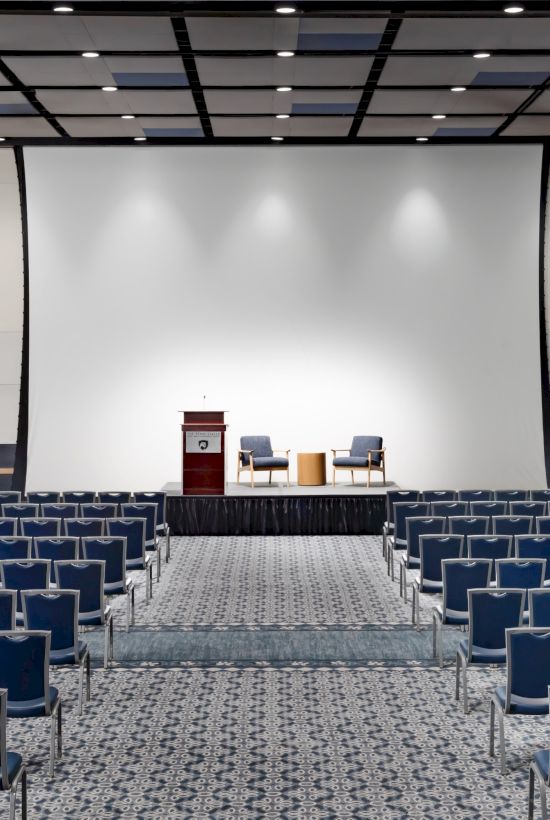
Combination of Capacity & Quality

State College Conference Center Planners' Tools

With 58,000 square feet of dedicated meeting space, The Penn Stater Hotel & Conference Center is a rare combination of capacity and quality. Our hotel near State College, PA is well equipped to accommodate executive retreats, business dinners, and events for up to 1,500 guests. Video conferencing, interactive learning systems, a multi-station computer lab, breakout rooms, and more set the stage for a successful meeting. And our State College conference center event planning team has been recognized nationally for the care they take to ensure the success of every occasion large or small.

View another section
  • Meeting Planner Checklist

    Event Coordinating Contact Vs. On–Site Contact

    If you are planning the conference but will not actually be on site, please let your planner know who the on-site contact from your organization will be.

    Confirm Conference BilLing

    • Direct bill
    • Budget
    • Purchase order
    • Pay upon departure
    • Credit card
    • Split billing
    • Bill to third party
    • Which individuals are able to sign conference charges to the master account?

    Confirm Guestroom BillIng

    • Guestroom and tax, incidentals billed to the individuals
    • Guestroom and tax billed to the group, incidentals billed to the individuals
    • Guestroom and tax, incidentals billed to the group

    Rooming List/cutoff Date

    • Rooming lists are due to your sales manager one month prior to the first day of your conference.
    • The cutoff date standard is one month prior to the first day of your conference. This date is listed on your contract as a reminder.
    • On the cutoff date, any rooms not picked up by your group or your rooming list will be released for public sale.

    Agenda

    Provide your planner with your agenda drafts throughout the planning process. When your program has been printed, send one to your planner.

    Provide FunCtion Room Itinerary for Each Room

    • Room start and end time

    Provide General Function Room SeTups for Each Function Room

    • Classroom
    • U-shape
    • Double U-shape
    • Conference
    • Theater
    • Hollow square
    • Clusters of
    • Rounds of
    • Chevron

    Provide Additional SEtup Information for Each Function Room

    • Registration table in/outside of room. How many tables? How many chairs?
    • Supply/material tables. How many needed and location in room?
    • Table with electric for your own audiovisual equipment.
    • Head table for how many people? If in a large room, do you want the head table raised? Will you need microphones for this table?
    • DJtable requirements
    • Coat rack
    • Extra chairs in rear of room
    • Stage or riser
    • Skirted tables for tabletop exhibits (additional charge)
    • Dance floor
    • Flag(s) – American or Pennsylvania

    Provide Specific Audiovisual Needs for EacH Function Room

    • Flipchart and markers
    • Easel/tripod
    • Whiteboard+
    • Bulletin board+
    • PowerPoint presenter/laser pointer
    • Screen
    • CDplayer or music & style
    • Podium &microphone
    • Tabletop microphone(s)- (for panel/head table)
    • Wireless lavalier/lapel microphone(s)
    • Wireless handheld microphone(s)
    • Conference speakerphone
    • Audio mixer
    • Audio/video recording
    • Digital Pro HDvideo camera
    • TVmonitor
    • Audio patch for computer/iPod to house sound
    • Polycom video conferencing
    • Unrestricted phone line
    • Ethernet/Internet line
    • Printer
    • Power strip/electric connection
    • Dell laptop computer
    • LCD projector
    • Dedicated audiovisual technician needed?

    Food and Beverage Menus GuiDelines

    • Menus are charged per person. Food and beverage is replenished throughout the buffet, break, or reception period.
    • An 18% service charge and 6% tax is applied to your total charges for your functions, unless you are tax exempt–then the 6% tax does not apply. The service charge is not taxed.
    • No outside food or beverage is permitted. All food and beverage is to be purchase through the hotels.
    • Standard time of service for food menus is 1½ hours (time extension will incur additional charges).
    • Guarantee/final counts for all food and beverage functions are due four working days prior to the event.
    • Provide your planner with any special dietary requirements for your group or your specific attendees.

    Food & Beverage Room Setups

    • Round tables are the standard setup. This provides the optimum service and setup in the room.
    • White linen, white napkins, and artificial succulent centerpieces are standard.

    Buffet Tips

    • Minimum for a breakfast or lunch buffet is 30 people.
    • Minimum for a dinner buffet is 40 people.
    • One double-sided buffet line per every 100 people.
    • Buffet menus will be displayed for a maximum time of 1½ hours (time extension will incur additional charges).

    Served Meal Tips

    If you wish to select more than one entree, you must provide the number of each entree when the final count is due (four working days prior to the event). You must provide entree indicators to designate each individual’s selection (place cards, tickets, or colored nametags).

    Alcoholic Beverage Service – Bar Types

    • Consumption/hosted – beverages are charged to the group master account by the number consumed.
    • Cash -The individual attendees pay cash for beverages.

    If your group is fewer than 40 people, you will be charged a bar setup fee of $75. If your group is more than 40 people, you will not be charged a fee.

    Budgetary Compromises for Beverage Service

    • You can have a consumption bar for a certain period of time, then change to a cash bar.
    • You can provide your attendees with a certain number of drink tickets and those drinks will be charged to the master. All other drinks (without tickets) will be on a cash basis to the individual.

    Day Meeting Package Coffee Breaks and Lunch

    • If you are on a day meeting package (DMP), your coffee breaks will be located in the common break areas. Hot and cold beverages are available from 7  m.to 5 p. m. The morning break food is available from 9 a. m. to 11 a. m., and the afternoon break food is available from 2 p. m. to 4 p. m.
    • Gardens Lunch Buffet (full hot buffet served in The Gardens Restaurant)

    Guarantee/final Counts

    • All guarantees for all food and beverage functions are due four working days prior to the event.
    • If your guarantee count increases within the four-day window, we will do our best to accommodate your increase.
    • If your guarantee count decreases within the four-day window, you will still be charged for your original guarantee count.

    Shipping Items

    • The Penn Stater Hotel does not have adequate storage space for large shipments. If you are shipping boxes to the hotel, please clearly address boxes with the following information: conference name, hotel event planner’s name, conference start date, and the name of the individual from your group who will be picking up the boxes. Please be sure to obtain tracking numbers.
    • If you are setting up a trade show with pipe and drape booths for vendor exhibitors, please have the vendor ship items directly to the exhibit company providing the pipe and drape. They will provide drayage to/from the property.

    Accommodations

    Inform your event planner of any special accommodations for any of your participants.

    Evaluation of Services

    You will receive a pre-event survey and post-event survey. We encourage you to fill out the survey–we value your opinion!

  • The Penn Stater’s Audio Visual Equipments

    Anchor Speakers

    Anchor speakers are powered portable loudspeakers. These have 3 inputs, 2 mic level inputs and 1 line level input i. e. microphones, ipods, laptop sound etc. Normally these speakers are used for outside functions or rooms that do not have sound systems in them.

    Audio Mixer

    Audio mixers, also known as mixers, are multiple input devices that enable you to mix microphones and audio sources and send to a single sound system. Hospitality Services has both digital and analog mixers. Most have 12-24 channels on them.

    Black Magic Video Switcher

    The Penn Stater uses a Black Magic Video switcher which allows for seem-less switching between multiple laptops or video sources for events. This switcher utilizes software and needs to be set up and run by our in house technicians.

    Dell Laptop Computer

    Hospitality Services uses Dell Laptops with a 17” screen, windows Seven and Microsoft Office 2013.

    Conference Phones (polycom)

    Hospitality Services conference phones are made by Polycom. They are triangular in shape and have microphones that can be placed throughout the room or we can connect most units to a sound system. These phones are analog. If you a have a conference that needs to contact more than two parties at once we will need to set up a phone bridge. Discuss with your conference service planner if needed.

    Easels

    A gold tripod stand used for holding signs, displays, etc.

    Ethernet Connection

    A high – speed internet connection that uses an Ethernet card in your computer to establish a connection. Our connections are currently running at 100 mb/sec. The other option for connecting to the internet is through wireless internet.

    Fast Fold Screens

    These are screens that can be assembled and placed in the larger rooms if needed. Currently we have 2 sizes available, 9’x 12’ and a 10’ x 20’ at the Penn Stater.

    Flipchart

    A tripod stand with a full pad of paper. Flipcharts will have 3 markers in the tray, a blue one, a red one and a black one.

    JVC Pro HD Video Camera

    Hospitality Services use a JVC GY–HM600U/GU Video Recorder. It can record in full HD 1080P Video. There are many options with this camera. It uses SD Cards to record on.

    Liquid Crystal Display (LCD) Projector

    Used to project a computer or video image onto a large screen. Our projectors are made by Epson with the brightest one being 6000 lumens to the smaller projectors ranging from 3000 to 5000 lumens. The projectors are compatible with both MAC and PC computers. Mac’ usually need an adapter/dongle. Hospitality Services has many adapters. Our projectors are placed in the back of the larger rooms or in control booths and have special long range lens in them. In smaller rooms we place them in the front of the rooms.

    Video Conferencing

    Videoconferencing is only available at the Penn Stater. We use a Polycom 7000 unit which runs over Internet Protocol (IP) lines. IP lines are like the internet connection in your offices. The Penn Stater has one HD unit that is portable and can be set up in any room. The camera has up to 4 presets. This unit has been used by groups the size of 1 person to 500. If you are planning a larger video conference please give as much advanced notice as possible. You always want to set up a test before the actual event to ensure there are no audio or video issues. When booking a videoconference please remember to block set up time which allows the AV department to set up the Polycom unit. Please contact the AV manager for pricing and any other questions concerning videoconferencing.

    Podium and Mic

    PSHS has large floor standing podiums with built in microphones. The podiums at the Penn Stater have the ability to lower and raise depending on the height of the presenter. All podiums have a light for the presenter and have a power outlet on them. Podiums are normally used in the larger rooms. When all floor standing podiums are in use and more podiums are needed we can use table top podiums. See Table Top Podiums.

    JBL Eon 612 Powered Speakers

    These speakers are similar to a DJ type of set up. These are very nice speakers that will accept microphones and audio sources. They have great sound and will work in a medium to large space and in outdoor functions.

    Speaker Phone

    A phone that is similar to your office phone. These phones have a built in speaker you can use so the whole room can hear the conversation. Speaker phones are often used in the smaller rooms. Our speaker phones do not have the capability of handling more than 2 parties at one time. Please refer to conference phones for more than 2 parties.

    Table Top Podiums

    Small podiums that sit on top of a table. All tabletop podiums have the option of adding a microphone to them. These are used in smaller rooms or can be used in larger rooms when all floor – standing models are in use.

    USB Webcam

    Normally we use an USB webcam for meetings that require a video conference via Skype, Adobe Connect or other video conferencing software. Our units are High Definition and made by Logitech.

    Wireless Handheld Microphone

    A wireless microphone shaped like a regular microphone that is held in your hand. Many times this microphone is used for general announcements for exhibitors, questions from an audience or best man speeches during wedding receptions. An on/off switch will be located on the mic itself. Our handhelds are made by Audio Technica.

    Wireless Lavalier Microphone

    A wireless microphone is one that a presenter would wear to enable them to walk away from the presentation area and be heard from anywhere in the room. The body- pack of the microphone usually is placed in a pocket of the presenter and the microphone itself is clipped onto the tie or blouse of the presenter. Most wireless lavalier mics have a simple on and off switch on the bodypack. Our lavaliers are made by Audio Technica.

  • Function Room Setup Styles

    Classroom Style

    Rows of tables with chairs behind. Allows attendees to take notes while listening to lecture style pres- entation. All attendees have good visual line to audio visual presentations. Limits the interaction between attendees. (Formerly called “schoolroom”.)

    Chevron Style

    Same as “Classroom Style” with angled tables.

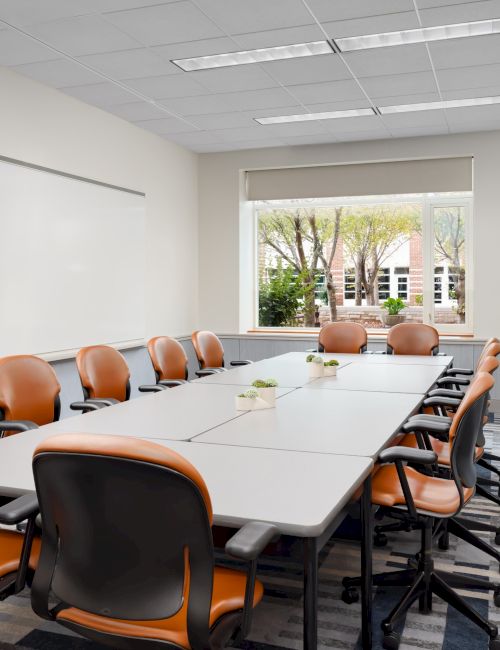
    Conference

    For small groups that require a lot of interaction like committees, boards, breakouts, etc. If the num- ber of people scheduled for this setup exceeds 14, it is suggested to change to a hollow square setup for better lines of vision for all participants.

    Clusters

    Clusters can be of varying amounts. The cluster setup is good for programs in which there is a lot of group work with the same groups throughout the day as well as facilitator interaction with the groups. When viewing the presenter and/or audio visual displays, some attendees’ backs are to the front of the room.

    Crescent Rounds

    Round banquet tables with chairs around half to three quarters of the table, facing the front. Used for meetings where interaction and note taking are essential. All attendees have full view of the facilita- tor and the audio visuals. Also good to use when the same room is booked for a meeting and meal with little turn time in between.

    Hollow Square

    Works for group meetings with frequent interaction. Not good when there is one main speaker and audio visuals. Allows for note taking as well.

    Rounds

    Mainly used for food functions and normally seat between 8 and 12 people, the optimum for maximiz- ing room sets and still allowing ample dining space is 10 people. (Formerly called ‘Banquet’ setup.)

    Theatre Style

    A setup with just chairs, also called ‘auditorium’ seating. Maximizes the number of people that can be accommodated in a room. Does not allow for easy note taking.

  • Event Venues in State College Pa at The Penn Stater

    From small conference rooms to large, lavish banquet halls, The Penn Stater Hotel & Conference Center has the ideal meeting space in State College for your event of any size. Host everything from board meetings and tradeshows to weddings and holiday parties in our modern, stylish spaces, complete with state-of-the-art audiovisual equipment, full-service catering, and flexible seating layouts.

    Conference Rooms

    Our 41 event venues in State College offer a variety of styles and seating capacities to fit your meeting needs. They feature ergonomically designed chairs, spacious working areas, centrally located break areas, high-speed Internet availability, and more. All conference rooms have great acoustics and natural light, as well as obstruction-free viewing for your attendees.

    Conference Room Highlights:

    • Sizes and seating capacities vary
    • AV equipment: built-in screens and control rooms, sun shades, blackout shades, wireless Internet availability, phone capabilities, in-house phone, sound amplification, bulletin boards, whiteboards
    • Audiovisual support
    • Polycom teleconferencing capabilities and teleconferencing capabilities

    Executive Conference Room

    This flexible space features wireless Internet availability, blackout shades, and gorgeous wooded views. It can be split into two rooms for smaller meetings.

    Room Details:

    • 884 square feet each (1,768 square feet for both)
    • Seats up to 100 guests (banquet style, both sections)
    • Audiovisual equipment – built-in screens, LCD projectors in the ceiling

    Mckinnon Board Room

    Combining comfort and advanced meeting technology, the McKinnon Board Room seats up to 14 guests (conference style) around a beautiful scissor table. Attendees will enjoy the convenience of built-in microphones and high-speed Internet availability at each chair.

    Room Details:

    • 884 square feet
    • Seats up to 14 guests (conference style)
    • Audiovisual equipment – two 61-inch plasma screens, Polycom videoconferencing, touch-panel audiovisual controls, DVD, mini DV/VHS player, CD player, digital cable, sound system, wireless microphones, and recording capability

    Senate Suites

    One of our most charming meeting facilities, the Senate Suites are ideal for a small meeting, banquet, or other private gathering. The space can be divided into three rooms and includes a lounge with full-service bar, comfortable furniture settings, and access to the outdoor terrace.

    Room Details:

    • 1,272 square feet total (624 square feet each)
    • Seats up to 80 guests (banquet style, both sections)

    Forum Rooms

    These convenient rooms accommodate up to 61 guests in two levels of U-shaped seating—ideal for an assembly or discussion. This comfortable, built-in seating and presentational arrangement makes longer sessions easy.

    Room Details:

    • 1,684 square feet
    • Seats up to 61 guests
    • Audiovisual equipment – control rooms and built-in screens
    • Bulletin boards and whiteboards
    • Sunshades and blackout shades

    Deans Hall

    This versatile hall offers functionality, with enough space to comfortably seat up to 300 guests. The neutral tones will coordinate with any decor you choose.

    Room Details:

    • 4,200 square feet
    • Seats up to 300 guests (banquet style)
    • Can be divided into two sections, each with its own screen

    Presidents Hall

    This expansive, elegant space consists of four adjoining halls that can accommodate plenary sessions, large banquets, and exhibitions. Partitioning is available for smaller groups.

    Room Details:

    • 10,650 square feet
    • Seats up to 936 guests (banquet style)
    • Can be divided into four sections, each with its own screen
    • 33’ diagonal screen on the end
    • Projection capability from the control booth

    Courtyard Lounge

    Small intimate space that is perfect for a small group.

    Room Details:

    • Seats up to 24 guests (banquet style)
    • Intimate space
    • Overlooking outdoor courtyard